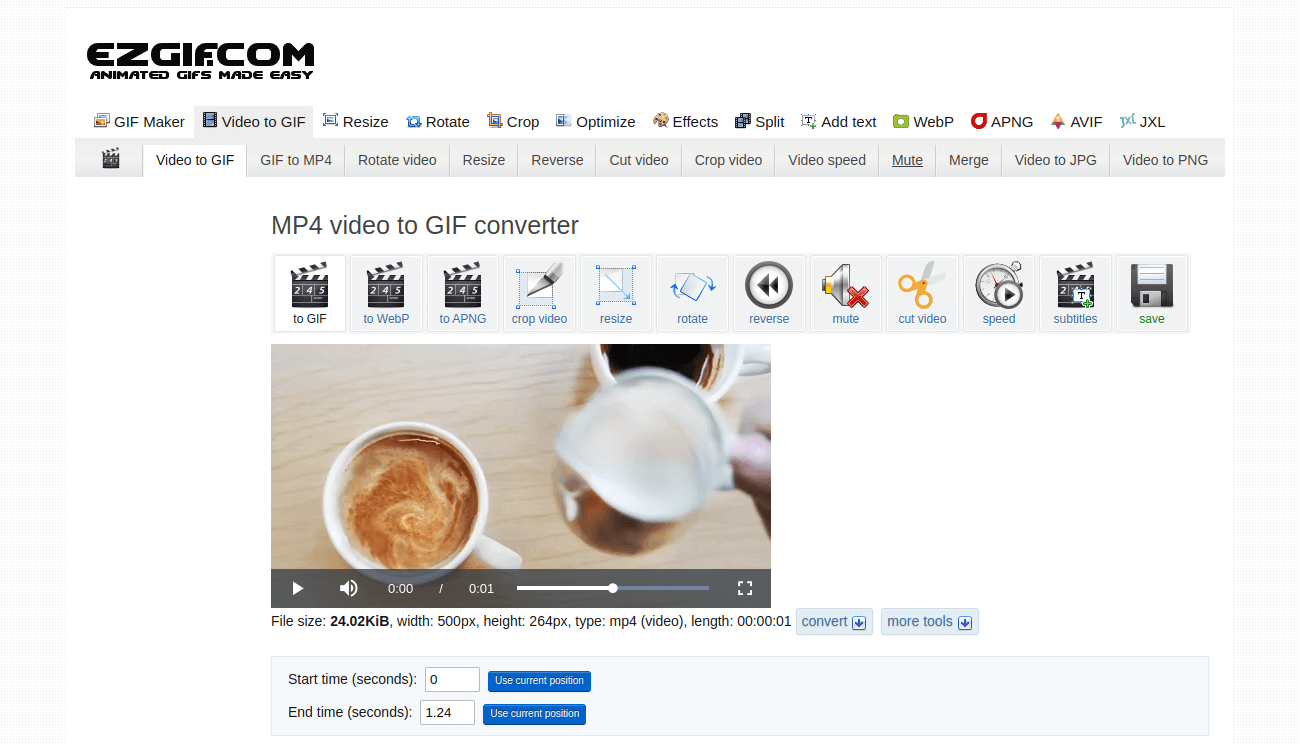
Convert MP4 to GIF Online: Fast, Free & Easy Steps for Dynamic Visuals
In today's fast-paced digital world, visual content reigns supreme. From engaging social media posts to helpful product demonstrations, the way we share information has evolved. While videos like MP4 files are powerful, sometimes a short, looping animation captures attention more effectively – and that's where GIFs come in. Converting an MP4 video to a GIF allows you to distill key moments into highly shareable, auto-playing visual snippets. If you're looking for a simple, efficient way to transform your videos, an online Mp4 To Gif Converter is your go-to solution.
This comprehensive guide will explore the benefits of converting MP4s to GIFs, delve into the nature of both formats, and provide a straightforward walkthrough on how to use a free online converter to create stunning animations from your videos. Get ready to elevate your visual communication!
Understanding the MP4 and GIF Formats: A Quick Primer
Before diving into the conversion process, it's helpful to understand the characteristics of both file types and why you might choose one over the other. Knowing their strengths and limitations will help you make informed decisions when creating content.
MP4: The Versatile Video Standard
MP4, formally known as MPEG-4 Part 14, is a ubiquitous digital multimedia container format. Its lineage traces back to Apple's QuickTime MOV format, but it has been enhanced with broader support for various MPEG features, making it incredibly versatile. Today, it's almost impossible to find a video device or application that doesn't support the MP4 format. These files are highly efficient, allowing for significant compression of large video and audio data while largely preserving quality. An MP4 file can house multiple video and audio tracks, subtitles, and extensive metadata – information like video title, album, and author – making it perfect for comprehensive video content.
GIF: The Animated Image Powerhouse
On the other hand, GIF, or Graphics Interchange Format, is one of the internet's most widespread and beloved animated image formats. Unlike MP4, a GIF is fundamentally a sequence of static images displayed in quick succession, creating the illusion of movement. Each frame remains on screen for a specified duration, resulting in a seamlessly looping animation. A significant advantage of GIFs is their support for transparency, allowing for creative layering effects. However, they do have a notable limitation: GIFs can only display a maximum of 256 colors. This makes them less suitable for photographs or complex images with subtle color gradients, but absolutely ideal for crisp logos, clear charts, line drawings, and, of course, the vibrant world of memes and reactions. For a deeper dive into the nuances of these formats, explore our article: MP4 vs GIF: Understand Formats & Free Online Conversion Benefits.
Why an Mp4 To Gif Converter is Essential for Modern Communication
The shift from longer video clips to shorter, looping animations isn't just a trend; it's a strategic move in digital communication. GIFs offer unique advantages that MP4s simply can't replicate in certain contexts. Here's why using an Mp4 To Gif Converter has become indispensable:
- Boosted Social Media and Chat Engagement: GIFs play automatically and loop endlessly across platforms like Twitter/X, Slack, Discord, Telegram, and iMessage. They embed directly inline within chat messages, bypassing the need for a video player or a "play" button. This instant gratification captures attention immediately, leading to higher engagement rates for your content.
- The Language of Reactions and Memes: GIFs are the quintessential tool for expressing emotions, humor, and witty reactions online. A perfectly timed GIF can convey more than words, adding personality and relatability to your digital interactions.
- Clear & Concise Demonstrations: For tutorials, software demos, or showing a specific UI interaction, GIFs are incredibly effective. A short, looping GIF in a README file, GitHub issue, Notion page, or support article can illustrate a process or code snippet without forcing the viewer to click play. They offer an immediate visual explanation, making complex information easier to digest. Keeping these under 10 seconds ensures the best user experience.
- Smaller File Sizes for Quick Loading (Often): While not always true for very complex GIFs, for short, focused animations, GIFs can sometimes offer a more lightweight alternative to an MP4, especially when optimizing for web performance where every millisecond counts.
- Accessibility and Shareability: The inherent design of GIFs makes them highly shareable. Their universal support across almost all digital platforms means you don't have to worry about compatibility issues.
For more insights into the strategic benefits of this conversion, check out our related article: Why Convert MP4 to GIF? Boost Social Media & Chat Engagement.
Choosing the Best Online Mp4 To Gif Converter: What to Look For
With numerous online tools available, selecting the right Mp4 To Gif Converter can seem daunting. However, focusing on a few key features will help you find a reliable and efficient service that meets your needs:
- Ease of Use: The best converters feature intuitive interfaces. Look for drag-and-drop functionality, clear buttons, and a streamlined process that doesn't require technical expertise. The goal is to convert your video to a GIF in just a few clicks.
- Speed and Efficiency: Time is precious. A top-tier online converter should be able to process your MP4 file and generate a GIF in seconds, even for larger videos, without making you wait unnecessarily.
- Quality and Customization: While GIFs have color limitations, you still want the best possible animation quality from your source video. Look for tools that offer options to control frames per second (FPS), output GIF size, and resolution. These features allow you to fine-tune the balance between animation smoothness and file size.
- Free & Secure: Opt for services that are 100% free to use, without hidden costs or subscriptions. Security is paramount; ensure the converter employs robust encryption (like 256-bit SSL) to protect your files during upload and download. Furthermore, a commitment to privacy, such as automatically deleting uploaded files after a few hours, is a strong indicator of a trustworthy service.
- No Registration or Email Required: For quick, one-off conversions, the hassle of creating an account or providing an email address is an unnecessary barrier. The best online converters allow you to get straight to work.
- Browser Compatibility: A good online tool should work seamlessly across all major web browsers and operating systems, offering universal accessibility.
By prioritizing these features, you can ensure a smooth, secure, and high-quality conversion experience every time.
Your Step-by-Step Guide to Using an Online Mp4 To Gif Converter
Converting your MP4 video into an engaging GIF animation is remarkably straightforward with the right online tool. Here’s a general, easy-to-follow process you can expect from most reliable Mp4 To Gif Converter platforms:
- Visit the Converter Website: Open your web browser and navigate to your chosen online MP4 to GIF converter.
- Upload Your MP4 Video:
- You'll typically see a prominent "Choose Files" or "Upload MP4" button. Click this to browse your device and select the MP4 video you wish to convert.
- Alternatively, many modern converters support a convenient drag-and-drop feature. Simply drag your MP4 file directly into the designated area on the webpage.
- Customize (Optional but Recommended): Some converters offer options to fine-tune your GIF before conversion. This might include:
- Trimming: Select the start and end points of your video to ensure only the most relevant segment is converted. This is crucial for keeping your GIF short and impactful.
- FPS (Frames Per Second): Adjusting this can affect the smoothness of the animation and the final file size. Higher FPS means smoother motion but a larger file.
- GIF Size/Resolution: You might be able to scale down the dimensions of the GIF to reduce its file size further.
- Initiate the Conversion: Once your file is uploaded and any desired customizations are made, click the "Convert to GIF" or similar button. The server will then extract frames from your video and assemble them into an animated GIF. This process usually takes anywhere from a few seconds to a couple of minutes, depending on the length of your video and the server's load.
- Download Your GIF: When the conversion status changes to "Done," a "Download GIF" button will appear. Click this to save your newly created animated image directly to your device.
That's it! No complex software installations, no registrations, and no email addresses required. Just a few simple steps to transform your videos into shareable GIFs.
Tips for Creating Highly Effective GIFs
While the conversion process is easy, creating GIFs that truly resonate requires a little strategic thinking:
- Keep it Concise: The golden rule for GIFs is brevity. Aim for animations under 10 seconds. Focus on capturing a single, clear action, emotion, or message. Longer GIFs often lose their impact and can have larger file sizes.
- Focus on the Core Message: Before converting, identify the most critical few seconds of your video. Trim aggressively to eliminate any unnecessary lead-in or follow-up footage.
- Consider Your Audience and Platform: Think about where your GIF will be shared. Memes for social media might prioritize humor, while a GIF for a technical documentation might prioritize clarity and detail.
- Balance Quality and File Size: While high FPS makes for smoother animation, it also increases file size. For web use, a slightly lower FPS (e.g., 10-15 FPS) might be acceptable if it keeps the file size manageable and loading times fast.
- Preview Your GIF: Always view your GIF before sharing to ensure it loops correctly, the timing is right, and the visual quality meets your expectations.
Conclusion
The ability to convert MP4 videos to GIF animations online offers unparalleled flexibility and power for anyone looking to create dynamic, engaging visual content. Whether you're crafting the next viral meme, demonstrating a software feature, or simply adding a touch of personality to your messages, an intuitive Mp4 To Gif Converter makes the process fast, free, and incredibly easy. By understanding the strengths of both formats and leveraging the convenience of online tools, you can effortlessly transform your videos into captivating, shareable loops that capture attention and communicate effectively across all digital platforms. Give an online converter a try today and unlock the full potential of your visual storytelling.